Compliance Dashboard Explained
Compliance Dashboard Explained
- Know what mandates, verification decisions, and audit events are.
- interpret dashboard signals without confusing them with raw infrastructure logs
- connect visual status to underlying evidence and policy checks
- identify which dashboard surfaces matter for compliance, operations, and leadership
A compliance dashboard is not the same as compliance itself. It is a lens that helps users see evidence status, trust posture, gaps, and operational signals. Mandaitor's dashboard concepts are useful because delegated authority and agentic action can generate many decisions. A human reviewer needs a summarized view that points to what matters.
The dashboard should answer four beginner questions: which mandates exist, which actions were verified, which evidence is complete, and which gaps require attention.
- Desktop
- Mobile
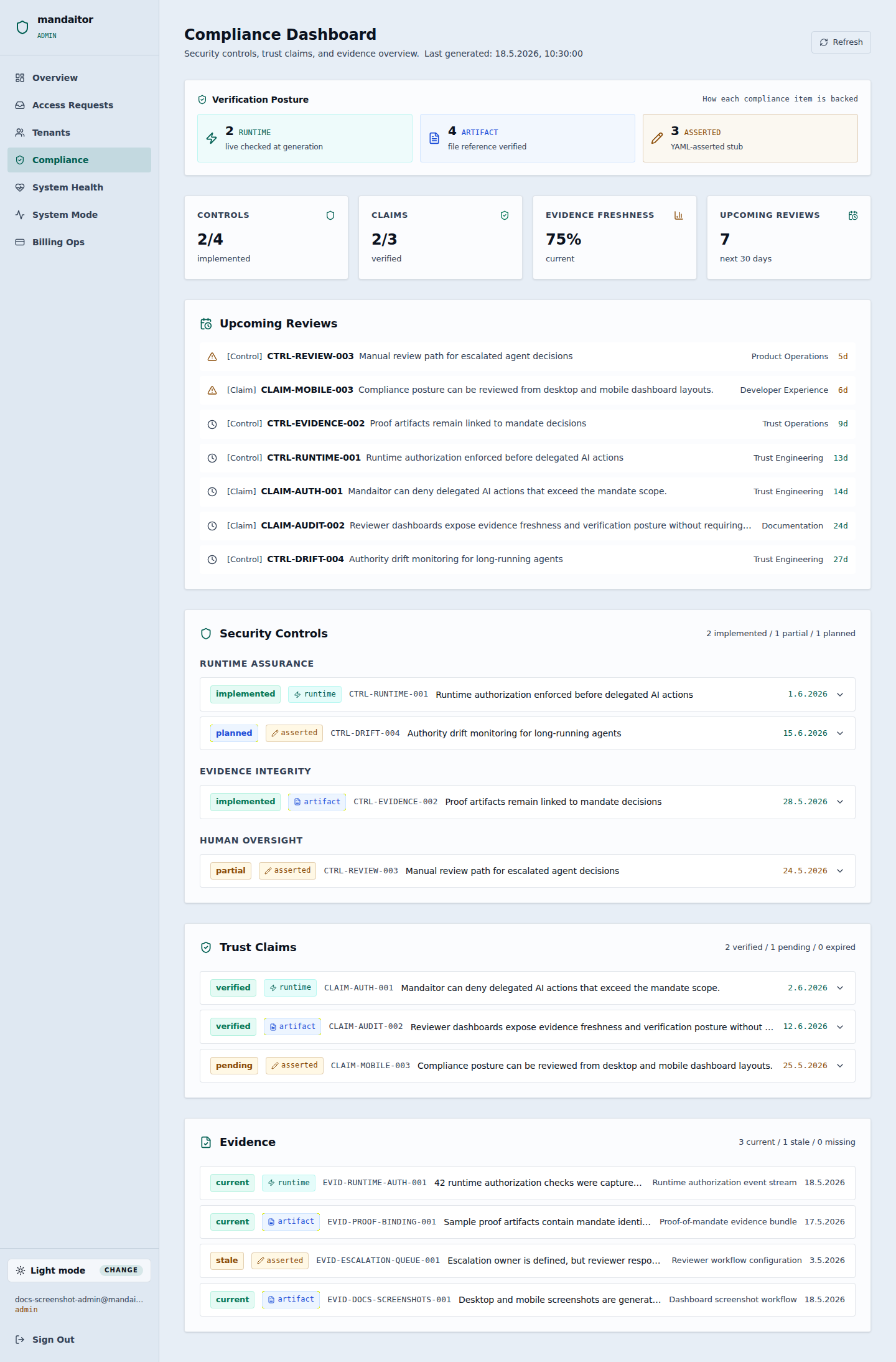

Dashboard concept map
| Dashboard area | What it means | Example user question |
|---|---|---|
| Mandate status | Whether authority objects are active, expired, revoked, or incomplete. | Which agents currently have active authority? |
| Evidence completeness | Whether decisions have enough supporting artifacts. | Can a reviewer understand why this action was allowed? |
| Verification outcomes | Counts and patterns of allowed, denied, approval, or missing-context results. | Are agents repeatedly trying actions outside scope? |
| Open gaps | Items that require remediation, review, or configuration. | Which mandates lack required constraints or evidence? |
| Trends | Changes over time in posture and behavior. | Is runtime assurance improving or deteriorating? |
Overview panel: posture, gaps, and recent runtime decisions
A reviewer should be able to move from summary status to the exact mandates, evidence, and runtime checks behind the signal.
| Widget | Current signal | What the learner should inspect |
|---|---|---|
| Authority posture | Healthy with 2 warnings | Active mandates are mostly complete, but two need closer review before expansion. |
| Open gaps | 3 unresolved items | Missing resource context, incomplete proof reference, and stale lifecycle setting. |
| Verification outcomes | 184 allowed · 21 denied · 6 escalated | Denials and escalations should be explained by mandate boundaries, not hidden as noise. |
| Evidence readiness | 87% complete | Reviewers can start sampling evidence, but the missing 13% blocks audit confidence. |
- Primary action: open the highest-risk warning before broadening agent authority.
- Secondary action: compare recent denials with expected policy test cases.
- Learning cue: green panels summarize configured checks; they do not replace human review.
Status breakdown: active, expired, revoked, incomplete
This view teaches that mandate lifecycle is part of authorization, not an administrative afterthought.
| Mandate group | State | Reviewer question |
|---|---|---|
| Customer-service record updates | Active | Are resource constraints precise enough for assigned accounts only? |
| Vendor payment requests | Warning | Is the amount threshold still aligned with finance policy? |
| Project validation submissions | Incomplete | Which evidence obligation is missing from the mandate template? |
| Legacy procurement assistant | Revoked | Are downstream integrations still attempting to use revoked authority? |
- Status signal: lifecycle state plus evidence health gives a stronger signal than either one alone.
- Product behavior: an expired or revoked mandate should cause runtime verification to deny or request renewed authority.
Evidence panel: proof material behind dashboard confidence
A dashboard is trustworthy only when the summarized score links back to reviewable proof, reason codes, and audit events.
| Evidence field | Example value | Completeness signal |
|---|---|---|
| Delegate identity | did:web:agents.example#finance-ops | Present |
| Mandate reference | mandate_finance_payment_request_v3 | Present |
| Verification reason code | denied_amount_threshold_exceeded | Present |
| Resource context | vendor_id and invoice_id | Present |
| Reviewer note | Missing for one escalated action | Gap |
- Reviewer action: open the incomplete evidence pack before claiming audit readiness.
- Learning cue: missing evidence is not always a failed action; it may be an instrumentation or process gap.
Reading status signals
Dashboard colors or statuses should be treated as prompts for action, not as final truths. A green status means the configured checks look acceptable. It does not prove that all organizational risks are gone. A warning means a reviewer should inspect context. A red or failed status means the system has detected a condition that should be remediated or escalated.
| Status | Plain-language meaning | Recommended reviewer action |
|---|---|---|
| Healthy | Configured evidence and mandate checks appear complete. | Continue monitoring and sample evidence quality. |
| Warning | Something may be incomplete, stale, or close to a boundary. | Inspect affected mandate, proof, or policy. |
| Gap | Required evidence, constraint, or configuration is missing. | Assign remediation and track closure. |
| Failed | A required check did not pass or a control is broken. | Escalate, pause affected workflow, or revoke authority. |
| Unknown | The dashboard lacks enough data to evaluate. | Improve instrumentation or integration context. |
From runtime events to dashboard posture
A dashboard is only as good as the events and evidence behind it. Runtime verification generates decisions. Decisions create audit events and proof references. Evidence completeness determines whether the dashboard can show reliable posture.
| Source signal | Dashboard interpretation | Possible follow-up |
|---|---|---|
| Many denials for one agent | The mandate may be too narrow, the agent may be misconfigured, or the agent may be overreaching. | Review prompt, policy, and resource model. |
| Expired mandates still requested | The workflow may not handle lifecycle correctly. | Update renewal, revocation, or fallback behavior. |
| Missing resource context | Tools may not send enough information for verification. | Improve integration payloads. |
| Proof age too old | Sensitive actions may require fresh verification. | Shorten proof validity or require re-checks. |
| Evidence packs incomplete | Review process may not be audit-ready. | Add required fields, proof references, or reviewer notes. |
Dashboard users have different needs
A developer may use the dashboard to debug verification behavior. A security reviewer may use it to find over-permissive mandates. A compliance reviewer may use it to prepare evidence. An executive may use it to understand whether agentic automation is operating under control.
| User | What they need from the dashboard | What they do next |
|---|---|---|
| Developer | Reason codes, missing fields, failed checks. | Fix integration payloads and tests. |
| Security architect | Mandate breadth, agent identity, and risky actions. | Refine policy and enforcement points. |
| Compliance reviewer | Evidence completeness and reviewable records. | Assemble or inspect evidence packs. |
| Product owner | Workflow friction and policy fit. | Adjust UX, approval paths, or templates. |
| Executive | High-level posture and unresolved gaps. | Prioritize governance investment. |
What a dashboard should not hide
Dashboards can create false confidence if they compress too much meaning into one score. Mandaitor users should expect the dashboard to reveal assumptions: what is measured, what is not measured, which data is live, which evidence is missing, and which areas are still preview or beta.
What to read next
Read Evidence Packs and Audit Events if you want to understand the raw material behind dashboard signals. Read Governance, Risk, and Compliance if you want to place those signals into a broader oversight model.
Save your learning progress
Mark this lesson as complete to update the Academy overview without requiring an account.